
Allstream Support Center

Allstream Support Center

  • Account Sign In
  • English
  1. Home
  2. US Support
  3. New Customer Information
  4. Different Ways to Pay Your Bill
  1. Home
  2. US Support
  3. Account & Billing Information
  4. Different Ways to Pay Your Bill
  1. Home
  2. US Support
  3. Frequently Asked Questions
  4. Different Ways to Pay Your Bill
Searching...

Different Ways to Pay Your Bill

We offer three convenient ways to pay your bill.

Automated Phone System

Call 866-468-3472 and select option 2 for payments. This is where you can make a payment using your credit card.

Mail

Mail your payment to: PO Box 734521 Chicago, IL 60673-4521. Please include the remittance slip that comes with your invoice to ensure the payment is made to your account in a timely manner.

Online

Payments can be made online using the Allstream portal. You can also use this portal to setup auto pay to your bank account or credit card.

Note: You must have added at least one payment account to your Accounts list to make a payment. For information about adding a payment account, see Adding a Payment Account.

[text-blocks id=”85″ slug=”account-login-button”]

[text-blocks id=”83″ slug=”first-text-block”]

Once you are signed in to the portal, from the MY ACCOUNT drop-down list, select Billing Center.
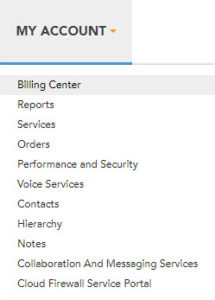
From the Accounts section of the Billing Center page, you can add a payment account or select an existing payment method to make a one-time payment or setup recurring payments.

To access a full library of Allstream Portal user documentation, sign in to your account at https://my.allstream.com/ and select User Guides from the SUPPORT menu.

For questions or to report problems, please contact our Customer Service team.

billing address, bill address, mailing your bill, sending your bill, postal address, how do you make a credit card payment, credit card payment
Tagged: billingpayment

Was this article helpful?

Yes No

Related Articles

  • Allstream Portal Documentation
  • Robocall Mitigation Service
  • Making a One-Time Online Payment
  • Adding a Payment Account
  • Public Info and Policies
  • How do I sign in to my account?

Support Topics

  • US Support
  • Canadian Support
  • Public Info and Policies

Contact Us (US)

Customer Service
866‑468‑3472
USCustomerService@allstream.com
Repair
800-360-4467
Unified Communications Repair
888-985-8010

Contact Us (Canada)

Customer Service
888-288-2273
CanCustomerService@allstream.com
Repair
866-282-0111
(available 24/7)
Unified Communications Repair
888-733-5744

Policies

  • Regulatory Affairs
  • US Internet Broadband Disclosure
  • Privacy Statement
  • Privacy Policy

Contact

  • Customer Service
  • Network Operations and Repair
© 2025 Zayo Group, LLC, Allstream Business, LLC. All rights reserved.
  • English